You can do pretty much what you like with your result: create signatures with name added, extras or stats, websets. Give all the credits that are required and for the tut to: Martine (link to http://chezmartine.com) for PSP 4 ALL (link to http://psp4all.com).
 Scrapkit: Tourbillon at Chez la Zette. Download here. Eye Candy 4000 > Gradient Glow. Fonts: 2Peas Fat Frog for the text and Pixelette for the credits. You can download my E-Book which will let you work without being connected. 
STEP 1: Elements and Tube Open an image 820x620 and fill with white. Drop Shadow: I used
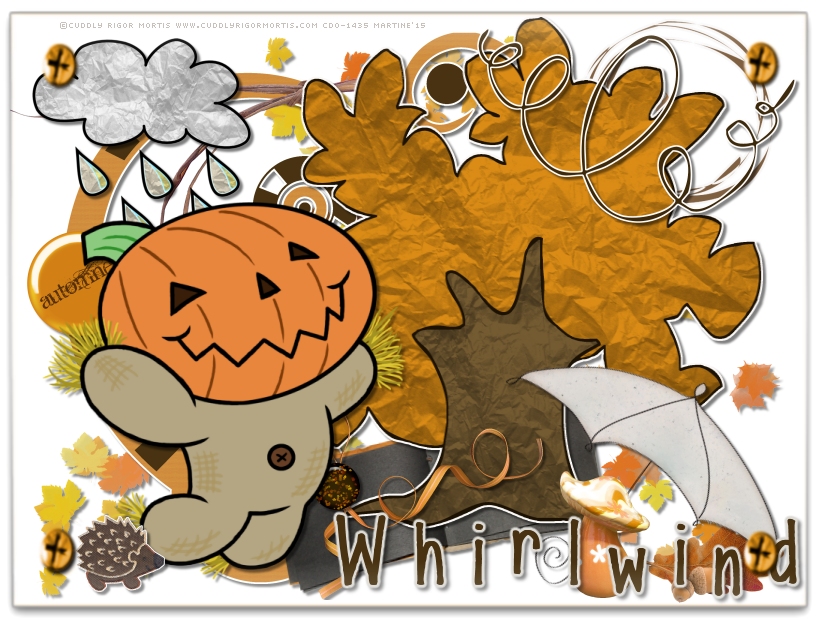
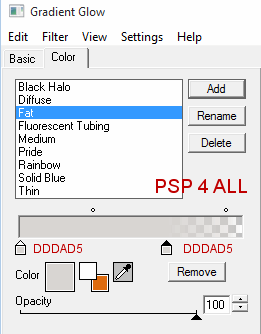
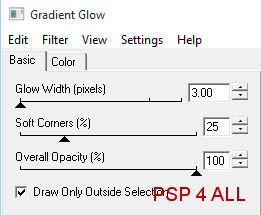
for all the elements, the tube and text. zette38-tourbillon-el (32) - 18%. Place on the left. Duplicate and Image > Flip. Move towards the right. zette38-tourbillon-el (11) - 22%. On the left. zette38-tourbillon-el (4) - 38%. At the top and on the right. zette38-tourbillon-el (21) - 10% then rotate left 10°. zette38-tourbillon-el (5) - 20%. At the top and on the left. zette38-tourbillon-el (2) - 25%. Towards the right. zette38-tourbillon-el (19) - 8%. At the bottom, on the book. zette38-tourbillon-el (33) - 25%. At the top and on the left. Image > Mirror. zette38-tourbillon-el (14) - 10%. At the bottom, on the left. zette38-tourbillon-el (35) - 25%. At the bottom, on the left. Rotate right 35°. zette38-tourbillon-el (40) - 10%. At the bottom, on the left. zette38-tourbillon-el (16) - 8%. On the book, on top of the ribbon. zette38-tourbillon-el (1) - 25%. At the top and on the right. zette38-tourbillon-el (15) - 12%. On the left and in the middle. Add votre tube on the left. zette38-tourbillon-el (38) - 15%. At the bottom and on the left.. ETAPE 2 : Credits with the Pixelette font or any other small pixel fon. ETAPE 3 : Text Whirlwind with the 2Peas Fat Frog font, using a colour from the tube #483211. Place on the right, at the bottom. Apply Eye Candy 4000 > Gradient Glow.
STEP 4: Frame and Save zette38-tourbillon-el (10) - Resize to have a frame 810 x 610. Colorize with the Hue at 26 and Saturation at 209. Place at the top of everything. File > Save. Martine 7 October 2015 If you have any questions, don't hesitate to contact me   |