|
 |
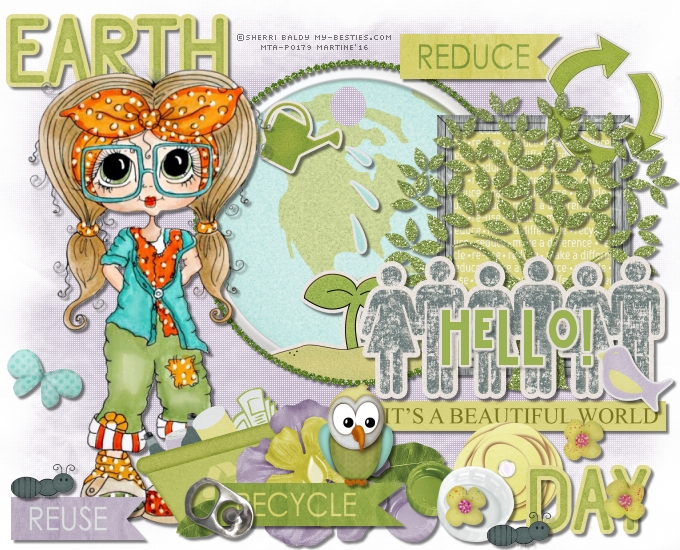
~*~ Earth Day ~*~
(Version française
ICI) |
|
|
 |
|
You can do pretty much what you like with your result: create signatures with
name added, extras or stats, websets. Give all the credits that are required and
for the tut to:
Martine (link to
http://chezmartine.com) for PSP 4 ALL (link to
http://psp4all.com).
This pointing hand is here to help you.
You can drag and drop it and use it as a marker to help with following the
tutorial.
Martine
 |

Tubes of your choice, free or not, but credit for them
must be added to your tag. I used a tube ©Sherri Baldy -
My Besties™, bought at
MtA.
Don't forget your license! It must be legible on your tag.
Scrapkits: Earth Day by
DigiTee Designs By Sheila -
Jeanet Almhoj.
Download
here and
here.
Mask: Mask #166 from Gem's Taggin' Scraps
here.
Plugin: penta.com > color dot & Eye Candy 4000 > Gradient Glow.
Fonts: BattleLines for the text & Pixelette for the credits.
You can download my E-Book which will let you work without being connected.

STEP 1: Mask and Elements
Open an image
680x550. Fill with white.
Drop Shadow: I used
Add another layer and fill with purple #866F91.
Open the mask
gemsmasks-166
and apply. Then delete. Set the opacity at 65.
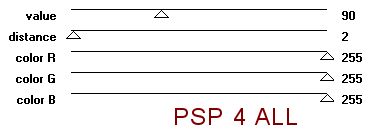
Apply penta.com > color
dot
|
 |
E_GlitterCircle_JeanetA - 17%. Middle and towards the top. See my tag.
Click inside the circle with the magic wand, add a layer and fill with white.
Add
another layerer and paste
SheilaReid_EarthDay_April2014Blogtrain_metalrimmedearthtag in the selection.
SheilaReid_EarthDay_April2014Blogtrain_littlesproutsticker - 18%. Bottom
of frame. Selections > Invert and click on Delete.
Select None.
Back on the GlitterCircle layer and add
SheilaReid_EarthDay_April2014Blogtrain_wateringcan - 11%. Top left.
E_WoodenFrame_JeanetA - 18%. On the right.
Click in the wooden rectangle frame with the magic wand. Selections > Modify
and expand by 5 pixels. SheilaReid_EarthDay_April2014Blogtrain_recyclewordspaper
- 10%. Paste as a new layer and move this layer under the frame. Selections > Invert
and Delete.
Select None.
SheilaReid_EarthDay_April2014Blogtrain_reducewordflag -
20%. Top right.
SheilaReid_EarthDay_April2014Blogtrain_recyclearrows
- 12%, above the frame and on the right.
SheilaReid_EarthDay_April2014Blogtrain_glittertree - 12%. Place the tree in
the frame.
WA_BeautifulWorld_JeanetA - 28%. Bottom of
frame. See my tag.
SheilaReid_EarthDay_April2014Blogtrain_earthwordart - 25%. Top left.
SheilaReid_EarthDay_April2014Blogtrain_daywordart - 25%.
Bottom right.
SheilaReid_EarthDay_April2014Blogtrain_iconicpeopleholdinghandssticker -
25%. Above the wordart.
Add your tube on the left.
SheilaReid_EarthDay_April2014Blogtrain_reusewordflag - 20%. Bottom left.
E_TinyButterfly_JeanetA - 15%. On the left of the tube.
SheilaReid_EarthDay_April2014Blogtrain_recyclebin - 20%. Bottom of tube.
SheilaReid_EarthDay_April2014Blogtrain_leaf01 - 12%. Bottom.
SheilaReid_EarthDay_April2014Blogtrain_leaf01 - 15%. Bottom.
SheilaReid_EarthDay_April2014Blogtrain_purplebottlecp - 20%.
SheilaReid_EarthDay_April2014Blogtrain_greenbottlelid - 20%.
SheilaReid_EarthDay_April2014Blogtrain_whitebottlecap - 21%.
SheilaReid_EarthDay_April2014Blogtrain_purplegreenflowerwithdewdrop -
18%.
SheilaReid_EarthDay_April2014Blogtrain_recyclewordflag - 20%.
SheilaReid_EarthDay_April2014Blogtrain_aluminumpoptabfastener - 25%.
SheilaReid_EarthDay_April2014Blogtrain_littlebirdie - 15%.
SheilaReid_EarthDay_April2014Blogtrain_littleant - 25%.
Duplicate - and place on REUSE.
E_TinyFlowers_JeanetA - 20%.
Owl_JeanetA - 13%.
STEP 2: Text and Credits
Texte Hello! or that of your choice in green #9AB251, using the font
BattleLines.
Apply Eye Candy > Gradient Glow.
Credits: with a small font like Pixelette or any other mall pixel
font.
Save your work.
Marti ne
14 April 2016
If you have any questions, don't hesitate to contact me
|