|
 |
~*~ Flowers ~*~
(Version française
ICI) |
|
|
 |
|
You can do pretty much what you like with your result: create signatures with
name added, extras or stats, websets. Give all the credits that are required and
for the tut to:
Martine (link to
http://chezmartine.com) for PSP 4 ALL (link to
http://psp4all.com).
This pointing hand is here to help you.
You can drag and drop it and use it as a marker to help with following the
tutorial.
Martine
 |

Tubes of your choice, free or not, but credit for them
must be added to your tag. I used a tube ©The Paper Shelter -
www.thepapershelter.com.
Don't forget your license! It must be legible on your tag.
Scrapkit:
Muguets-Freebies-MD Juin by
Mariel Designs. Free kit to download
here.
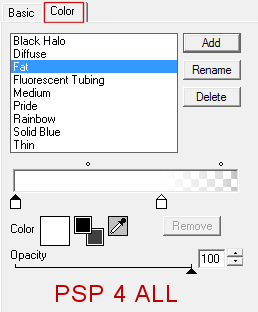
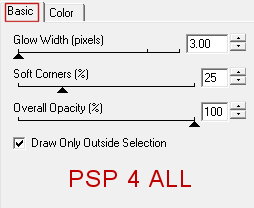
Plugins : Eye Candy 4000 - Gradient Glow.
Fonts:
Dominique for the text and Pixelette for the credits.
You can download my E-Book which will let you work without being connected.

STEP 1: Elements and Tube
Drop Shadow: I used this, in black
Open an image 680x550. Fill with white.
Add a layer. Click on
MD-32. Edit > Copy. Then back to your work, Selections > Select All. Edit
> Paste Into Selection. Move the selection towards the top. Keep selected.
Add
a layer. Click on
MD-35. Edit > Copy. Then back to your work, Edit > Paste Into Selectionans la sélection et mettre vers le haut.
Move the selection towards the top. Selections > Select None.
MD-53 as a new layer, towards the bottom.
MD-FRAME 3 -
80%. In the middle.
MD-FRAME 1 - 95%. In the middle.
With the lasso tool, draw a
circle following the text of the frame MD-FRAME 3. Add a layer the
Selections > Select All. Click on MD-23 and Edit > Copy then Edit > Paste
Into Selection. Selections > Select None.
MD-23 in the frame MD-FRAME 3. Move these 2 layers under MD-23.
Activate the layer withMD-23.
Add the tube.
MD-44 - 50%. Towards the bottom, left. Duplicate and place the
copy on the right.
MD-33 - 10%. Top, left.
MD-28 - 8%. Top, right. Rotate 25°, left.
MD-2 - 65%. Rotate right 90°. Place at the bottom, on the right.
MD-40 - 45%. On the right.
MD-42 - 40%. On top. Adjust > Sharpen > Sharpen.
MD-3 - 65%. On the left.
MD-43 - 45%. On the left.
MD-39 - 65%. On the left. Remove the vase at the bottom, only keep the
flowers.
MD-15 - 10%. On the right.
MD-6 - 50%. In the middle.
MD-54 - 10%. On
MD-6.
MD-34 - 50%. On th right. Duplicate. Duplicate a second time and
place the copy on the left. Duplicate the copy and place on the left.
MD-25 - 15%. On the left. Duplicate and the copy on the right. See
the tag.
MD-38 - 15%. On the left.
MD-16 - 10%. On the right. Duplicate and put the copy on the
right.
ETAPE 2: Wordarts and Credits
Wordart: Text of your choice, your name or my text with the font
Dominique, in black, Vector. Rotate left and place the text on the left. Layers >
Promote to Layer.
Apply Eye Candy > Gradient Glow
Apply a Drop Shadow
0, 2, 40, 2.
Credits: with a font like Pixelette or any other small pixel
font.
Save your work.
Martine
29 May 2018
If you have any questions, don't hesitate to contact me
|
|