You can do pretty much what you like with your result: create signatures with name added, extras or stats, websets. Give all the credits that are required and for the tut to: Martine (link to http://chezmartine.com) for PSP 4 ALL (link to http://psp4all.com).
 Scrapkits: The Digiscrapparade Freebie - Commencement May2016 - Digital Scrapbook Ingredients; Kimeric Kreations & LJS Designs. Download here: 1; 2; 3. Mask: Vix_BigMasks - Set 2 ---> Vix_BigMask017. Download ici. Fonts: 2Peas Airplanes for the text & Pixelette for the credits. You can download my E-Book which will let you work without being connected. 
STEP 1: Mask, Elements and Tube Drop Shadow: I used
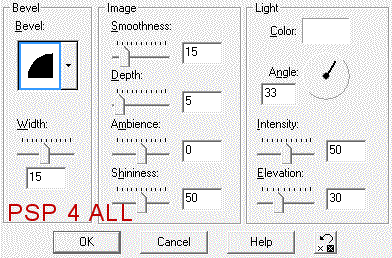
Open an image 680x550. Fill with white. Add a layer and fill with #736F6E. Open the mask Vix_BigMask017 and apply. Then delete. Set the opacity at 45. Aljs-dsp-commencement-card2 - 30%. kimeric_commencement_ele_frame - 22%. Rotate 90°, left. With the magic wand, click inside the frame then add a layer. Click on ljs-dsp-commencement-card1-6x4 and paste in the selection. Select none. kimeric_commencement_ele_scatterflower (1) - 25%. Top left. kimeric_commencement_ele_scatterflower (2) - 20%. On the left, below the other one. ljs-dsp-commencement-foliage - 15%. Right, bottom of the frame. kimeric_commencement_ele_key - 15%. Middle. Rotate left 25°. ljs-dsp-commencement-flower2 - 15%. On the foliage. See my tag. ljs-dsp-commencement-flower3 - 15%. See my tag. ljs-dsp-commencement-flower1 - 15%. ljs-dsp-commencement-chevrons - 13%. Top of frame in the middle. Add the tube, on the left. DSI_Commencement_wordart2 - 20%. Top, towards the left. DSI_Commencement_wordart3 - 18%. Bottom right. DSI_Commencement_flower2 - 18%. Bottom. DSI_Commencement_flower3 - 12%. Bottom. DSI_Commencement_flair - 15%. On the left. DSI_Commencement_star2 - 8%. Right corner of the frame. DSI_Commencement_star1 - 6%. Slightly below. Duplicate. Colorise with the Hue at 114 and Saturation at 93. Place at the top, on the right of the chevrons. See my tag. STEP 2: Text and Credits Text 1 - Hi!, in black #000000, using 2Peas Airplanes. Apply a 3D Effects > Inner Bevel.
Credits: with a small font like Pixelette or any other mall pixel font. Save your work. Martine 24 May 2016 If you have any questions, don't hesitate to contact me   |