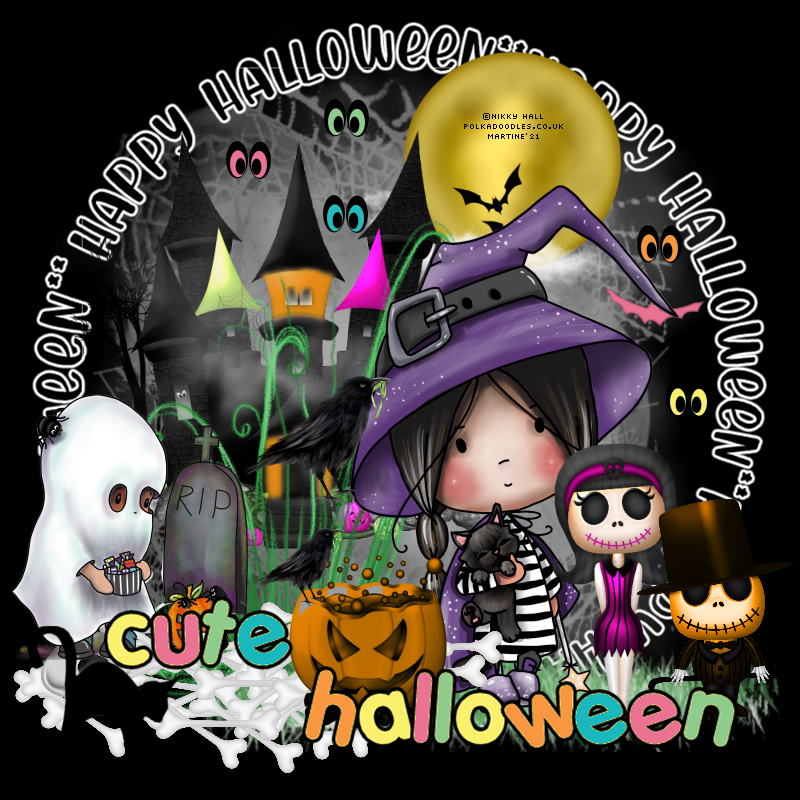
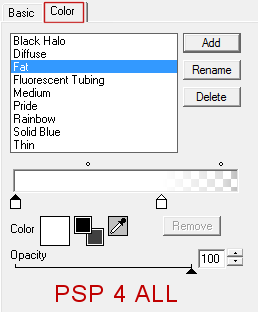
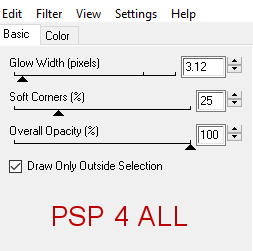
STEP 1 - Mask, Wordart and Elements Open an image 800x800. Fill with #000000. We can resize at the end before adding the credits. Add a layer and fill with #FFFFFF. Layers > New Mask Layer > From Image and choose. Check Invert mask data. Select AS_Halloween Mask1. Click on OK. Layers> Merge Group. Resize 82%. Wordart - cYdySA, 120%. Then apply Eye Candy 4000 > Gradient Glow.
Adjust > Sharpness > Sharpen More. jojo_freebie_cute_halloween_element46 - 65%. On the right. jojo_freebie_cute_halloween_element14 - 80%. On the left. jojo_freebie_cute_halloween_element49. On top of the castle. jojo_freebie_cute_halloween_element29 - 30%. On the right. jojo_freebie_cute_halloween_element38 . On the left, toward the bottom. jojo_freebie_cute_halloween_element 58. On the right, bottom. jojo_freebie_cute_halloween_element 54. On the left, bottom. Add the tubes. jojo_freebie_cute_halloween_element41 - 70%. jojo_freebie_cute_halloween_element40 - 50%. jojo_freebie_cute_halloween_element37 - 15%. jojo_freebie_cute_halloween_element61 - 120%. Separate the 2 words and place as you see fit. jojo_freebie_cute_halloween_element35 - 45%. Les yeux - jojo_freebie_cute_halloween_element30; jojo_freebie_cute_halloween_element31; jojo_freebie_cute_halloween_element32; jojo_freebie_cute_halloween_element33; jojo_freebie_cute_halloween_element34 - 18%. Here and there. ETAPE 2 - Credits with a small pixel font like Pixelette or one of your choice.
|