You can do pretty much what you like with your result: create signatures with name added, extras or stats, websets. Give all the credits that are required and for the tut to: Martine (link to http://chezmartine.com) for PSP 4 ALL (link to http://psp4all.com).
 Scrapkit: PDS_Zoo Pals, FTU kit by Chassity on her blog Polka Dots Scraps. Download here. The 5th one down Mask: Becky Mask 038 - Secrets of The Imagination (no longer online). Download here. Plugins: Eye Candy 4000 - Gradient Glow. Fonts: Good Dog Plain et O Whoa DNA for the texts and Pixelette for the credits. You can download my E-Book which will let you work without being connected. 
Drop Shadow: I used this when necessary
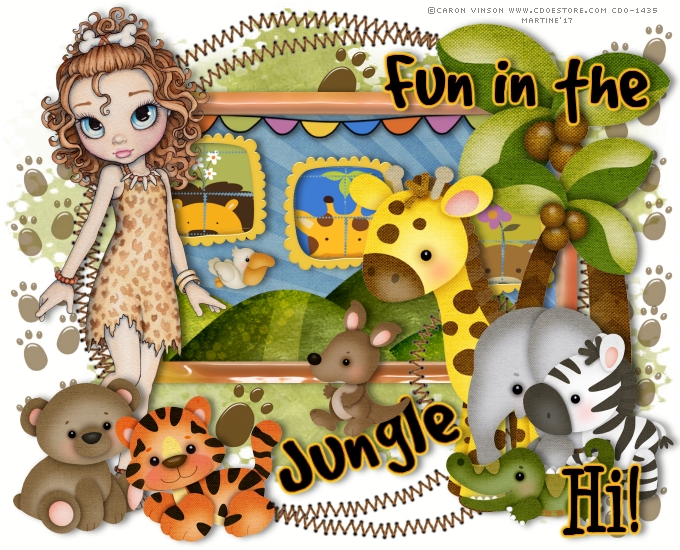
STEP 1: Mask Open an image 680x550 and fill with white. Copy paste PDS_ZP- paper7 as a new layer. Open mask Becky Mask 038. Apply the mask. Layers > New mask layers > From Image. STEP 2: Elements and Tube PDS_ZP- pawprints - 50% and opacity 62%. Place on the left. Duplicate and place this copy on the right. Duplicate again and place on the right, top, delete the excess. PDS_ZP- frame3 - In the middle. PDS_ZP- paw - 20%. Top and in middle. Duplicate and place copy towards the bottom. PDS_ZP- frame2 - 75%. Towards the top and middle. PDS_ZP- paper6 - 50%. In the middle of PDS_ZP- frame2 and move the paper layer under. PDS_ZP- banner - 75%. Top of frame and under PDS_ZP- frame2. Cut a bit of the end of PDS_ZP- frame3 and place on top of PDS_ZP- frame2, on the right.
PDS_ZP- frame5 - 20%. Duplicate so as to have 3 frames in all and place as on my tag. Fill the frames with PDS_ZP- stamp2, PDS_ZP- stamp4 and PDS_ZP- stamp1 at 40%. PDS_ZP- palmtree - 80%. On the right. PDS_ZP- palmtree - 60%. On the right and Image > Mirror. Add your tube on the left. PDS_ZP- giraffe - 60%. On the right, bottom. PDS_ZP- elephant - 35%. On the right, bottom and Image > Mirror. PDS_ZP- zebra - 35%. On the right, bottom. PDS_ZP- crocodile - 35%. On the right, bottom. PDS_ZP- pelican - 18%. In PDS_ZP- frame2 and under the first little frame. PDS_ZP- bear - 35%. Bottom left. PDS_ZP- tiger - 35%. Left, bottom and Image > Mirror.
STEP 3: Text and Credits
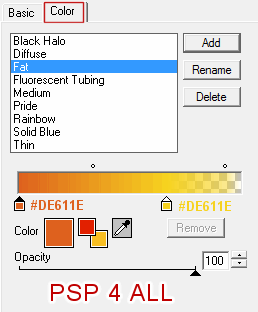
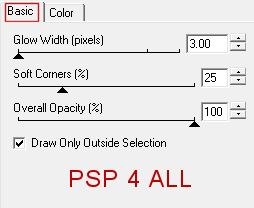
Then separate the word Jungle from the rest and apply a slight rotation left of about 30°. Place at the bottom. See tag. Hi! with O Whoa DNA in blackand apply the same Gradient Glow. Credits: with the Pixelette font or any other small pixel font. STEP 4: Last element PDS_ZP- kangaroo - 35% sur le mot Jungle. Save your work. Martine 25 May 2017
If you have any questions, don't hesitate to contact me
|