You can do pretty much what you like with your result: create signatures with name added, extras or stats, websets. Give all the credits that are required and for the tut to: Martine (http://chezmartine.com) for PSP 4 ALL (http://psp4all.com).

Scrapkit: New Year - Freebie2012 by Eileens Design. Direct link: here or here (temporarily). Word Art: New Year's Word Art Freebie by Cupcake sprinkles. Direct link: here. Font: Pixelette for the credits. Plugins: Eye Candy 4000. You can download my E-Book which will let you work without being connected. 
Then add a drop shadow: I used
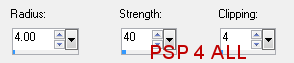
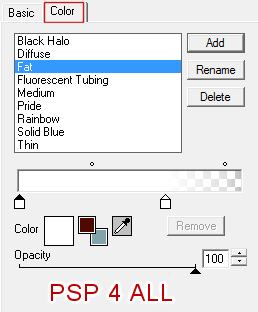
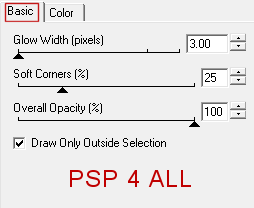
Element30 - resized to 70%. Place on the right. Click inside with the magic wand. Element24 - copy paste inside the selection. Element45 - resized to 40%. Add as a new layer. Selections > Invert and click on Delete. Selections > Select None. Element31 - resized to 70%. Place on top and on the right, towards the bottom. Element43 - resized to 30%. On the right. Element14 - resized to 35%. On the left of the wine bottle. Element34- resized to 40%. On the right. Element7 - bottom, in the middle. Element6 - resized to 40%. Top right. Element8 - resized to 40%. A bit on the left of the other balloon. Element39- resized to 75%. On the left. Element18- resized to 40%. On the left. Add your tube. Then these four elements: Click on the black background and add Elements 2, 3 and 4. And above element19. STEP 2: Credits and Word Art Credits: with a small pixel font like Pixelette. Word Art: resized to 45% then apply a Gradient Glow. Effets > User Defined Filter > Plugins >Eye Candy 4000 > Gradient Glow
STEP 3: Tag done Now save as a jpg after optimizing or in png format. Martine 18 December 2012 If you have any questions, don't hesitate to contact me   |