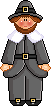
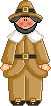
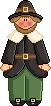
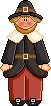
Let's shade it in. I used 4 different shades for the skin, 4 shades for the clothes from black to light grey. And for the hair, 4. For the buckles, 2 colours. Use the Palette Maker to create your different colours! Then colour as below
for the shoes, I added a new layer and then drew two white pixels. Apply a gaussian blur and merge visible. and that's it! Save as a PSP file, you may want to recolour it at a later date using the method outline in Part 1 of this tutorial. To save as a gif, open your PSP file - with all layers merged visible - in Animation Shop and save using the settings on this page: Transparence Martine November 2nd 2006 If you have any questions, don't hesitate to contact me   |