You can do pretty much what you like with your result: create signatures with name added, extras or stats, websets. Give all the credits that are required.
 Scrapkit: DCD_MAYDAY_TS par Digicats (And Dogs). Download here. Mask: MB and SW Mask 14 by Moonbeams & Spiderwebs. Download here. Word Art: FTU Spring Word Art by Kathyfrances at Escape From Reality. Download here. Plugins: penta.com; Eye Candy 4000. Font: Pixelette for the crédits. I used this Drop Shadow H 2, V 3, O 55, B 5 and for the WordArt H 1, V 1, O 100, B 1. You can download my E-Book which will let you work without being connected. 
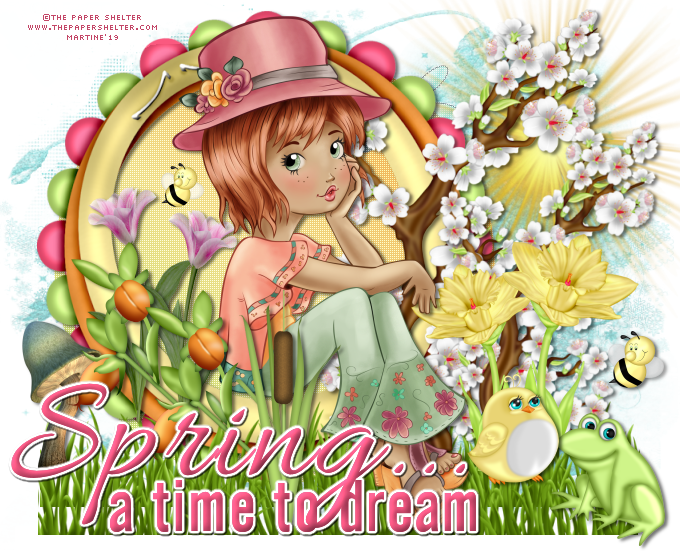
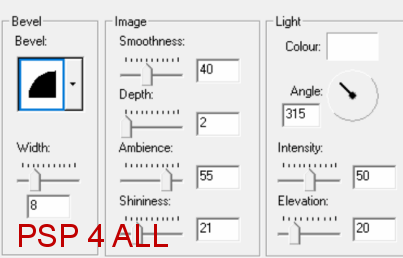
STEP 1 Open an image 680 x550. Fill with white. Add a layer and fill with p2. Open mask MB and SW Mask 14. Layers > New Mask Layer > From Image and choose MB and SW Mask 14. Click on OK. Layers > Merge Group. STEP 2 CD_MayDay_Sun - 80%. Top, right DCD_MayDay_Frame02 - 80%. Top, left. DCD_MayDay_Tag. Slide under the frame. Apply penta.com > color dot - default settings: 90, 2, 255, 255, 255. Back on the frame layer. DCD_MayDay_GrassyBorder - 75%. Bottom of the frame then duplicate. DCD_MayDay_CherryBlossoms - 75%. Image > Rotation left 90° and place on the right. Dupliquer and resize to 80%. DCD_MayDay_Mushroom - 35%. Left, bottom. DCD_MayDay_CuteBee - 13%. In theframe, at the top and on the left. DCD_MayDay_CuteBee - 10%. Bottom, on the right. DCD_MayDay_Daffodil - 30%. Bottom, right. DCD_MayDay_Daffodil - 40%. Image > Miroir horizontal. En bas, à droite. DCD_MayDay_Frog01 - 30% En bas, à droite. DCD_MayDay_CuteBird - 25%. En bas, à droite. DCD_MayDay_Tulip - 40%. A gauche. Dupliquer. Image > Mirror horizontal. Add the tube. In the middle of the frame. DCD_MayDay_Greenie - 40%. Bottom, on the left. Duplicate. DCD_MayDay_Cattail - 40%. Bottom. STEP 3 WORD ART - Selections > Select All. Selections > Float. Selections > Defloat. Add a layer and fill with #D74D72. Click on Effects > 3D Effects > Inner Bevel
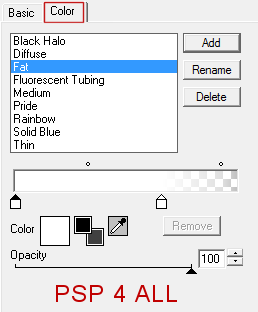
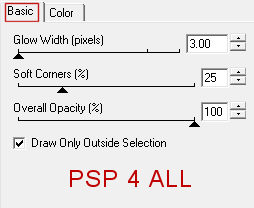
Then apply Eye Candy > Gradient Glow
Selections > Select None. Add a Drop Shadow: 1, 1, 00, 1. STEP 4 Credits: with a font like Pixelette or any other small pixel font. Save your work. Martine 1 May 2019 If you have any questions, don't hesitate to contact me   |