|
 |
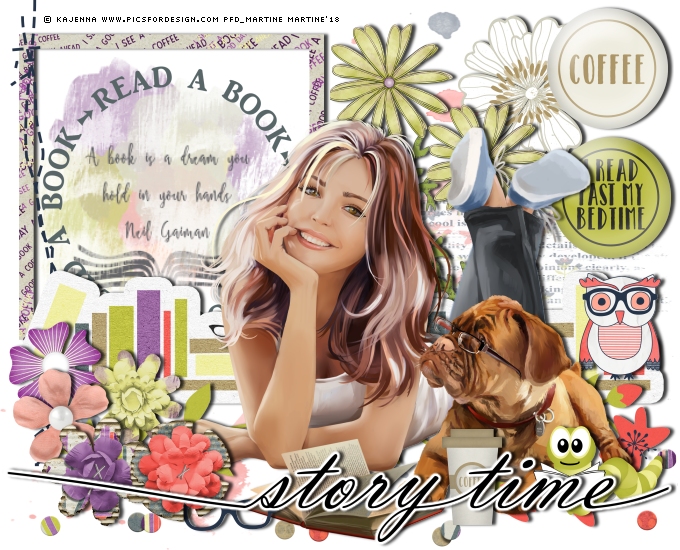
~*~ Story Time ~*~
(Version française
ICI) |
|
|
 |
|
You can do pretty much what you like with your result: create signatures with
name added, extras or stats, websets. Give all the credits that are required and
for the tut to:
Martine (link to
http://chezmartine.com) for PSP 4 ALL (link to
http://psp4all.com).
This pointing hand is here to help you.
You can drag and drop it and use it as a marker to help with following the
tutorial.
Martine
 |

Tubes of your choice, free or not, but credit for them
must be added to your tag. I used a tube ©Kajenna -
www.PicsForDesign.com.
Don't forget your license! It must be legible on your tag.
Scrapkits: 1.
April Pixel Scrapper Blogtrain
"A Mug & A Book", free kit offered by
Dhariana Scraps, download
here.
2.
April Pixel Scrapper Blogtrain "A Mug & A Book",
free kit offered by Donna's Digital Designs, download
here.
3.
April Pixel Scrapper Blogtrain "A Mug & A Book",
free kit offered by Sonia
Roman at Sscraps, download
here.
4.
April Pixel Scrapper Blogtrain "A Mug & A Book",
free kit offered by Gina at Thrifty Scraps,
download
here.
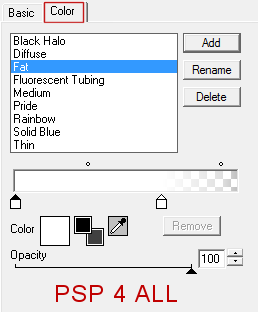
Plugin: Eye Candy 4000 > Gradient Glow.
ùmp: Read All About It "StoryTime" at
The Scrapping Sisters. The wordart can be downloaded
here. Link is dead so download
here.
Police: Pixelette for the credits.
You can download my E-Book which will let you work without being connected.

STEP 1: Elements and Tube
Drop Shadow: I used this, in black
Add a layer.
Selections > Select All. Copy Paste Sscraps_AMAAB_Mask
Into Selection. Selections > Select None Opacity at 50.
dhariana_PSblogtrainAPR2018_A_Mug_and_a_Book_el (7) - 25%. Top, left.
With the magic wand, click inside the frame.
Selections > Modify > Increase by 5 pixels. Add a layer and fill with
white.
Slide this layer under the frame.
Keep selected and add a layer.
dhariana_PSblogtrainAPR2018_A_Mug_and_a_Book_el (5)- Edition > Copy.
Edition > Paste Into Selection.
Selections > Select None. Opacity
65%.
ddd_A-Mug-and-Book-word circle - 28%. Centered in frame.
dhariana_PSblogtrainAPR2018_A_Mug_and_a_Book_el (11) - 28%. Left of
the frame.
ddd_A-Mug-and-Book-flower - 10%. Top, right.
ddd_A-Mug-and-Book-flower2 - 20%. Left of the first flower.
Duplicate this new flower and move down a little bit.
dhariana_PSblogtrainAPR2018_A_Mug_and_a_Book_el (17) - 35%. Towards
the bottom. See tag.
Sscraps_AMAAB_Flower 4 - 28%. Image > Free Rotate > Right 90%.
tsbg_amugandacup_confetti - 25%. Bottom.
Sscraps_AMAAB_Owk - 12%. Bottom, right.
tsbg_amugandacup_flare03 - 22%. On the right, towards the top.
tsbg_amugandacup_flare01 - 22%. Above.
Add the tube.
dhariana_PSblogtrainAPR2018_A_Mug_and_a_Book_el (13) - 13%. On the left,
towards bottom.
dhariana_PSblogtrainAPR2018_A_Mug_and_a_Book_el (14) - 12%. On the left.
Sscraps_AMAAB_Glasses Blue - 7%. A gauche du tube, en bas.
Sscraps_AMAAB_Flower 2 - 20%. On the left.
tsbg_amugandacup_flower02 - 15%. On the left.
tsbg_amugandacup_flower03 - 13%. On the left.
tsbg_amugandacup_mug01 - 7%. Bottom, near the tube.
ddd_A-Mug-and-Book-bookworm- 10%. Bottom, right.
ETAPE 2 : Word Art and Credits
Word Art: Story Time - 25%.
Delete a bit of the swashes on the left and right so the wordart is within the
tag.
Apply Eye Candy 4000 >
Gradient Glow.
Martine
18 April 2018
If you have any questions, don't hesitate to contact me
|
|