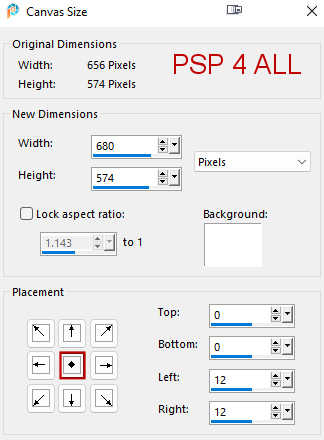
Scrapkit: Tropical Paradise, freebie by Miggins. Download here. Material: Sun,mask and gradient. Download here. Sweet Summer Template by Tonya - Tonya Temptations. Download here. Plugins: Eye Candy 4000 > Gradient Glow. Font: Pixelette for the credits. Open the template. Duplicate. Close the original. For each layer, do this: Selections > Select All. Selections > Float > Selections > Defloat. Add a layer > Fill with the new colour or a paper Apply the plugin. And Drop Shadow. Selections > Select None. Then either Delete or close the original layer. Then move on to the next layer. Drop Shadow: -3, 3, 55, 4 except for the birds: -3, 3, 35, 4 and WA: 1, 1, 100, 1. STEP 1 Open the template. Window > Duplicate. Close the original. The template measures 800x700. Image > Resize > 82% - Check Resize all layers Click on Image > Canvas Size
Close or delete the Credits layer. White Background - Add a layer. Selections and fill with miggs_syho_tropical paradise (9).jpg. Open FL-mask062. Layers > New mask layer > From an image. Select the mask. OK. Layers > Merge group. Rectangle Set 3 - Fill with miggs_syho_tropical paradise (1).jpg. Apply Eye Candy 4000 > Gradient Glow
Drop Shadow: 3; 3; 55; 4. Rectangle Set 2 - Fill with miggs_syho_tropical paradise (2).jpg. Apply the same Gradient Glow and the same Drop Shadow. Rectangle Set 1 - Fill with miggs_syho_tropical paradise (2).jpg but recolor first. Adjust > Hue and Saturation > Colorize: Hue 128 and Saturation 244. Apply the same Gradient Glow and the same Drop Shadow. Right Circle 2 - Fill with #FB193E. Drop Shadow. Left Circle 2 - Fill with #FB193E. Drop Shadow. Right Circle 1 - Fill with miggs_syho_tropical paradise (7).jpg. Left Circle 1 - Fill with miggs_syho_tropical paradise (8).jpg. Right Rectangle - Fill with the gradient: Anodized Rainbow. Angle=45° et Repeat=0. Image > Flip > Flip vertical. Duplicate > Image > Mirror Horizontal. Place over Left Rectangle. Bigger Circle Background - Fill with #FB193E. Bigger Circle - Fill with the gradient: Anodized Rainbow. Angle=45° et Repeat=0 Sun Rays - Fill with #FBF805. Circle - Fill with miggs_syho_tropical paradise (9).jpg. Circle Border - Fill with #FB193E. Drop Shadow. STEP 2 - Wordart et Elements Wordart by Tonya - Fill with #FBF805. Drop Shadow: 1, 1, 100, 1. miggs_syho_tropical paradise (3).png - 15%. Layers > Arrange > Move Down and repeat several times until the tree is right above Left Rectangle in the Layers Palette. Duplicate and Image > Mirror Horizontal. Apply a Drop Shadow on each tree: -3, 3, 55, 4. miggs_syho_tropical paradise (10).png - 12%. On the right. Dupliquer = 95%. Dupliquer = 95%. Drop Shadow: -3, 3, 35, 4. miggs_syho_tropical paradise (9).png - 15%. Left. Drop Shadow: -3, 3, 55, 4. miggs_syho_tropical paradise (8).png - 15%. Drop Shadow: -3, 3, 55, 4. miggs_syho_tropical paradise (5).png - 10%. Drop Shadow: -3, 3, 55, 4. miggs_syho_tropical paradise (14).png - 15%. Drop Shadow: -3, 3, 55, 4. miggs_syho_tropical paradise (17).png - 17%. Drop Shadow: -3, 3, 55, 4. miggs_syho_tropical paradise (12).png - 9%. Drop Shadow: -3, 3, 55, 4. miggs_syho_tropical paradise (15).png - 10%. Drop Shadow: -3, 3, 55, 4. miggs_syho_tropical paradise (16).png - 17%. In the middle. Drop Shadow: -3, 3, 55, 4. miggs_syho_tropical paradise (19).png - 8%. Drop Shadow: -3, 3, 35, 4. miggs_syho_tropical paradise (21).png - 8%. Drop Shadow: -3, 3, 35, 4. STEP 3 - Credits Credits: with a small pixel font like Pixelette or any other small font Martine 30 June 2022 If you have any questions, don't hesitate to contact me   |