You can do pretty much what you like with your result: create signatures with name added, extras or stats, websets. Give all the credits that are required and for the tut to: Martine (link to http://chezmartine.com) for PSP 4 ALL (link to http://psp4all.com).
 Scrapkit: Good Gobble at Tasha's Playground. Download here. Mask: Mask 015 by Yez. Or any other mask. Plugins: Eye Candy 4000 > Gradient Glow. Fonts: Agency FB Bold for the text and Pixelette for the credits. You can download my E-Book which will let you work without being connected. 
STEP 1: Mask Open an image and fill with black. Open the mask yezmask015 and apply. Masks > New > From image - OK. Then Masks > Delete. In PSP 8 and above, it's under Layers > New Mask Layer > From Image. OK then Delete. ETAPE 2: Elements and Tube Drop Shadow: I used
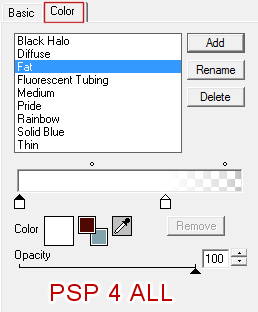
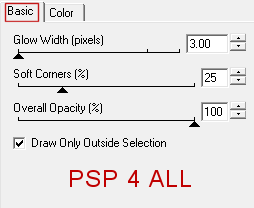
leaves - On the rigjht. Duplicte and place the copy on the left. wheel - Colorise. Adjust > Hue and Saturation > Colorise: hue = 16 and saturation = 182. frame3 - in the middle of the wheel. frame2 - in the middle of frame3. turkey2 - in the middle of frame2. leaf3 - on the left. wheat1 - above. Duplicate and Image > Mirror. flower corner - above. bear - 60% and above. Add your tube on the right. flower3 - bottom of tube, to hide the feet that I cut off. Duplicate and place this layer behind the tube. apple - 45%. Same reasonn. acorn - 45% acorn2 - 45%. Rotate right 90°. owl - 35%. In the middle. flower corner - above. bear - 60% and above. Ajouter votre tube on the right. wordart - Colorise with the Hue at 14 and Saturation at 248. pumkin - On the left. wordart2 - Colorise in black then apply this Gradient Glow.
candles - At 75%. On the left. cupcake - At 35%. On the left. Turkey3 - 35%. On the word Thankgiving, on the right. Pie slice - 45%. Pear - 25%. On the left. STEP 3: Yout text and Credits Text of your choice using the Agency FB Bold or write your name then apply Eye Candy > Gradient Glow. Credits with the Pixelette font or any other small pixel font. File > Save. Martine 20 November 2014 If you have any questions, don't hesitate to contact me   |