Tubes of your choice of your choice, free or not, but
credit for them must be added to your tag. I used a tube © Lori Karels-
www.lorikarels.com. If you use the same tube, you must buy it at
Up Your
Art and use it with your own license.
Scrapkit: Song Of Love by
Molemina Scrap
- Download
here.
Plugins: Eye Candy 4000 > Gradient Glow.
Police: Pixelette for the
credits.
You can download my E-Book which will let you work
without being connected.

STEP
1: Elements and Tube
Open a transparent image in
PSP. Add a layer and fill with white.
Add another layer. Selections > Select all.
Copy paste MoleminaScrap_SongOfLove_el (122) in the selection.
Selections >
Select none.
Set the opacity at 52.
Duplicate > Flip.
Aadd
another layer. Selections > Select all.
Copy paste
MoleminaScrap_SongOfLove_el (123) in the selection.
Selections >
Select none.
Color to match your tube. I used #1973A9.
Set the opacity at 30.
Once each element is resized, sharpen if necessary:
Adjust
> Sharpen > Unsharp Mask
Then a drop shadow: I used
MoleminaScrap_SongOfLove_el (30) - 18% in the middle towards the top.
Elements below the frame
MoleminaScrap_SongOfLove_el (61) - 8%
and at the top, on the right.
MoleminaScrap_SongOfLove_el (99) - 17% and on the left. Delete the excess
outside the frame, at the top.
MoleminaScrap_SongOfLove_el (19) - 18%. Image > Flip.
MoleminaScrap_SongOfLove_el (22) - 20%. Select the hearts only and paste
at the top end of element 19.
MoleminaScrap_SongOfLove_el (9) - 12%, on the left.
MoleminaScrap_SongOfLove_el (12) - 12%. Mirror and rotation left of
90°.
MoleminaScrap_SongOfLove_el (13) - 18%. Mirror and rotation left of 120°.
MoleminaScrap_SongOfLove_el (53) - 10%. Rotation 30° to the right.
Tube in the frame
With the Lasso tool, trace a selection along the border of the frame, then
either use the image of your tube if there is one, or a paper or your own colour
with the tube of your choice.
Selections > Invert and delete the excess
paper, tube.
Duplicate the tube and place exactly above. Set the Blend mode to Overlay.
Elements above the frame
MoleminaScrap_SongOfLove_el (88) - 2%. On the left. Rotation to the right 30°.
MoleminaScrap_SongOfLove_el (86) - 2%. On the left. Rotation to the left 30°.
MoleminaScrap_SongOfLove_el (21) - 18%. On the right.
MoleminaScrap_SongOfLove_el (74) - 2%.
MoleminaScrap_SongOfLove_el (41) - 10%, on the left.
MoleminaScrap_SongOfLove_el (16) - 12%. Rotation to the right of 30°.
MoleminaScrap_SongOfLove_el (47) - 8%. Rotation 45° to the right.
MoleminaScrap_SongOfLove_el (48) - 8%. Rotation 45° to the left.
MoleminaScrap_SongOfLove_el (114) - 12%. On the frame, in the bottom
corner, on the right.
MoleminaScrap_SongOfLove_el (115) - 12%. Image > Mirror. On the right.
MoleminaScrap_SongOfLove_el (46) - Colorize with Hue at 250 and Saturation
at 0. At 6%.
MoleminaScrap_SongOfLove_el (46) - 6%.
MoleminaScrap_SongOfLove_el (6) - 3%.
MoleminaScrap_SongOfLove_el (4)
- 4%
MoleminaScrap_SongOfLove_el (5) - 4%.
MoleminaScrap_SongOfLove_el (69) - 6%. Rotation 45° to the right.
MoleminaScrap_SongOfLove_el (69) - 5%.
MoleminaScrap_SongOfLove_el (121) - 8%. On the right, at the bottom.
MoleminaScrap_SongOfLove_el (101) - 8%. On the right.
MoleminaScrap_SongOfLove_el (107) - 20%.
STEP 2 : Wordart
MoleminaScrap_SongOfLove_wa (7) - I separated the word Love from the
rest of the wordart and colored it in red.
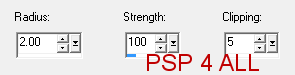
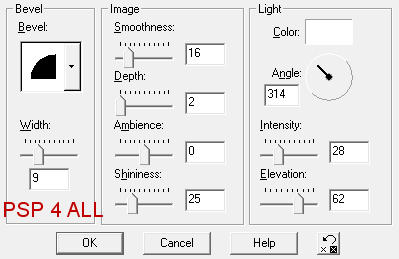
Apply an Inner Bevel
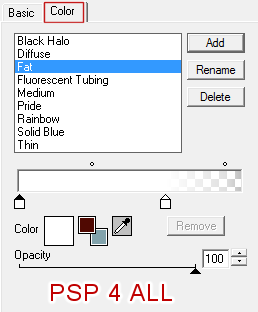
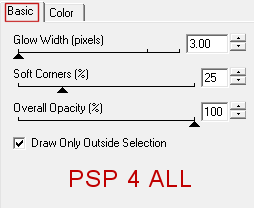
Then apply a Gradient Glow
Et une ombre portée.
STEP 3 : Credits
with the Pixelette font or any other small pixel font.
-------------------------------
File >
Save.
Martine
6 February 2014
If you have any questions, don't hesitate to contact me