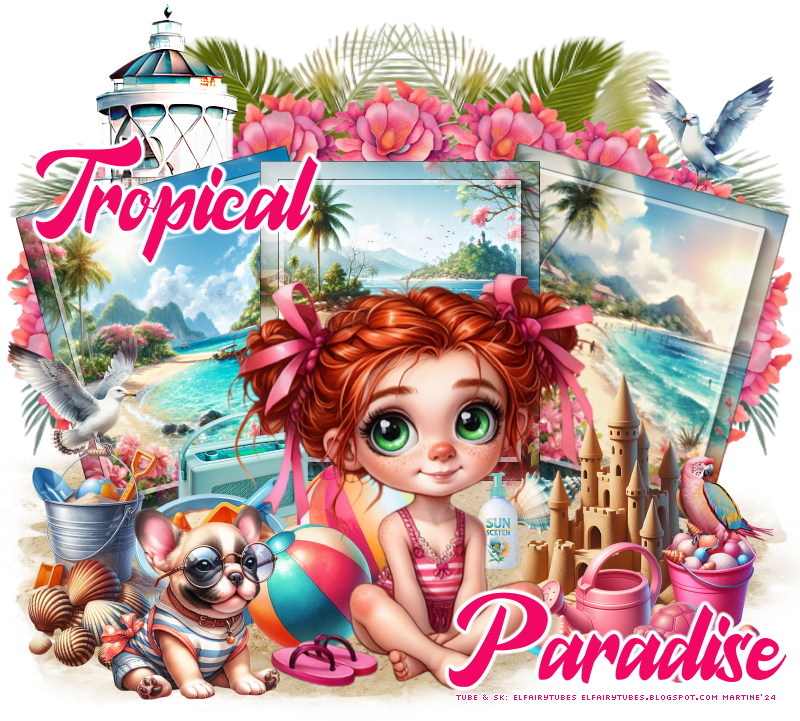
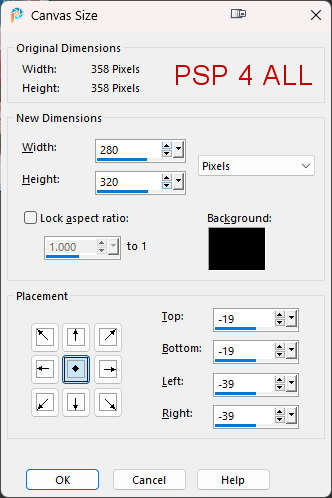
Scrapkits: Play on the beach & Tropical Beach par Elfairy à Elfairy Tubes Plugins: Mura's Meister > Copies AAA Frames > Foto Frame Eye Candy 4000 > Gradient Glow Fonts: DeLatto for the WA and Pixelette for the credits. STEP 1 - The 3 frames 1. Open an image 800 x 800. 2. paper_EF (15) - Resize 55%. 3. Image > Canvas Size ---> 280x320.
4.
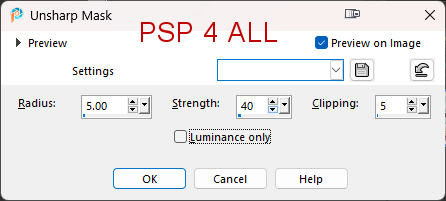
Sharpen > Unsharp Mask
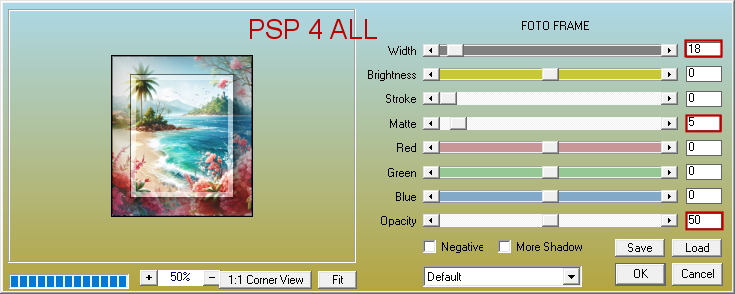
5. Apply AAA Frames > Foto Frame.
6. Edit > Copy. 7. Back onto your work and Edit > Paste as a new layer. 8. Activate the pick tool (K on your keyboard). 9. Modify Position X=280.00 and Position Y=175.
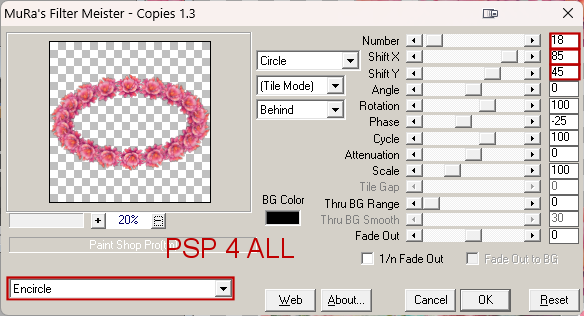
10. Press the M key to deactivate the pick tool. 11. paper_EF (13) - Repeat these steps 2, 3, 4, 5 and 6. 12. Place on the left. 13. Image > Free Rotate 15° left. 14. paper_EF (12) - Repeat these steps 2, 3, 4, 5 and 6. 15. Place on the right. 16. Image > Free Rotate 15° right. STEP 2 - Under the 3 frames 17. element_ef (19) - 20%. Paste as a new layer. 18. Apply Mura's Meister > Copies > Encircle
19.Activate the pick tool (K on your keyboard).. 20. Modify Position X=6.00 and Position Y=93.
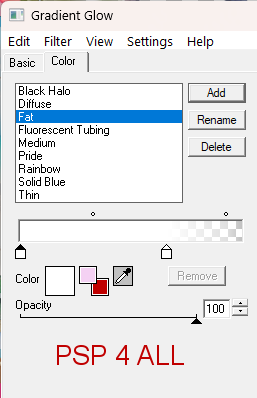
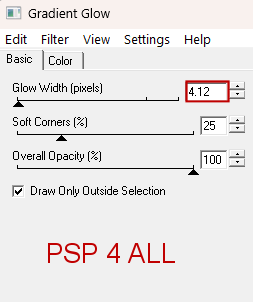
21. Press the M key to deactivate the pick tool. 22. Layers > Arrange > send to bottom. 23. element_ef (41) - On the left. 24. Layers > Arrange > send to bottom. 25. Duplicate. Image > Mirror horizontal. 26. Delete the 2 trunks showing at the bottom of the tag. 27. Element_ef (33) - Send to the bottom of the pile and move above the flowers and under the 3 frames. 28. Layers > Duplicate and move down on the right. 29. Duplicate and place on the left. Adjust these sand layers at the end when the tag is finished. STEP 3 -Above the 3 frames *** On the left *** 30. element_EF (24) - 25% 31. element_ef (12) - 20% 32. element_ef (32) - 20%. 33. element_EF (26) - 25%. 34. element_EF (62) - 20%. 35. element_EF (43) - 30% 36. element_EF (36) - 20%. *** On the right *** 37. element_EF (12) - 15% 38. element_ef (5) - 15%. 39. element_EF (17) - 12%. 40. element_EF (37) - 15%. 41. element_EF (58) - 20%. Image > Mirror. 42. element_EF (49) - 12%. *** In the middle *** 43. Add the tube. STEP 3 - WA and Credits 44. WA: Write Tropical Paradise with the DeLatto font - colour #F30765. 45. Appy Eye Candy 4000 > Gradient Glow > Fat.
46. Credits - with a font like Pixelette or any other small pixel font. 47. Save. Martine 10 July 2024 If you have any questions, don't hesitate to contact me   |